Strategic Insights Discovery (SID)
The SID feature is designed to simulate conversation with human users over a messaging platform. It works by employing natural language processing (NLP) to understand and interpret user inputs, allowing it to generate contextually relevant responses.
Accessing SID is convenient through a button located at the bottom right corner of every window within the platform. This strategic placement ensures easy and quick engagement with the chat functionality.
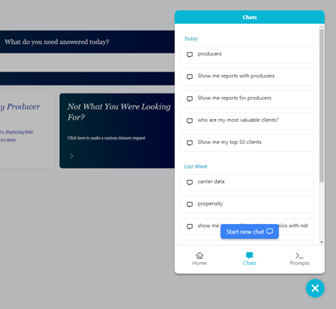
Upon opening the chat window, users will discover three distinct interaction methods with the chatbot: Home, Chat, and Prompts.
Home
Within the SID “Home” area, users can get started by asking a question or conveniently view suggested prompts facilitating effortless retrieval of available reports. This streamlined process ensures effortless access to available reports and a user-friendly experience within the chatbot interface.
Chat
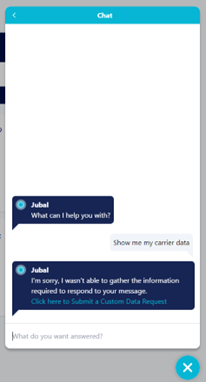
In the SID "Chat" section, users can seamlessly review their recent conversations, up to the last 30 days, or initiate a new chat. SID will return relevant reports based on the user’s request. SID employs user inputs to improve its understanding over time. In instances where it cannot provide the expected results, it offers an option to enter a “custom data request.” Users are encouraged to make use of this feature, as it significantly contributes to refining the chatbot's performance according to specific user needs and preferences. This straightforward interface empowers users with the flexibility to manage existing interactions and effortlessly commence new conversations within the platform.
Prompts
To explore all available reports, users can navigate to the "Prompts" section of SID. This dedicated space offers a comprehensive overview of prompts, enabling users to efficiently access a range of predefined reports within the platform.